Showing posts with label HACKING. Show all posts

Saturday, 29 July 2017

HOW TO FIND WINDOW IP ADDRESS OR WEBSITE ADDRESS IN CMD

Windows users, here is how I can find my IP address. First, click the Start Menu, and select Run. Next, type ”cmd” into the box and click the ”OK” button. Finally, at the prompt, type ”ipconfig” or “ping” and information about your IP Address will be displayed. STEP:1:- Open the command prompt. Press ⊞ Win+R and type cmd into the field. Press ↵ Enter to open the Command Prompt.In Windows 8, you can press ⊞ Win+X and select the Command Prompt from the menu.

STEP 2:- Run the “ipconfig” tool. Type ipconfig and press ↵ Enter. This will display a list of your network connection information. All of the network connections on your computer will be displayed.

STEP 3:- Find your IP Address. Your active connection may be labeled Wireless Network Connection, Ethernet adapter, or Local Area Connection Mac Address. It may also be labeled by the manufacturer of your network adapter. Find your active connection and look for IPv4 Address

Ping a Website/IP Address in CMD

Run the ping command. Type “ping,” then a single space and then the name of any website or IP address. It is not necessary to include “http://” at the beginning of the address, but you should include the “www” portion of the address. A good ping command should read as follows:
Example:-  ping www.formerinformation.com

Pinging www.formerinformation.com [50.62.172.113] with 32 bytes of data:
Reply from 50.62.172.113: bytes=32 time=472ms TTL=54
Reply from 50.62.172.113: bytes=32 time=412ms TTL=54
Reply from 50.62.172.113: bytes=32 time=362ms TTL=54
Reply from 50.62.172.113: bytes=32 time=332ms TTL=54
Ping statistics for 50.62.172.113:
Packets: Sent = 4, Received = 4, Lost = 0 (0% loss),
Approximate round trip times in milli-seconds:
Minimum = 332ms, Maximum = 41ms, Average = 394ms
output is the “ping statistics” section at the bottom. A standard Windows ping command sends out four packets of information. The statistics tell you how many of the packets were received by the server or site you are pinging, and the percentage of packet loss the command registered.
Ideally, for a healthy Internet connection, you want to see four packets sent, four packets received, and 0% packet loss.

10 SIMPLE STEP’S HOW TO BECOME A HACKER?

Hacking is surely not easy. To become a hacker one has to have an attitude and curiosity of learning and adapting new skills. You must have a deep knowledge of computer systems, programming languages, operating systems and the journey of learning goes on and on. Some people think that a hacker is always a criminal and do illegal activities but they are wrong.

We have prepared a list of 10 most important step’s necessary to become a hacker.

Step 1:- Computer networking

You need to know the differences between different types of networks and must have a clear understanding of TCP/IP and UDP to exploit vulnerabilities (loop holes) in system.
Understanding what LAN, WAN, VPN, Firewall is also important.
You must have a clear understanding and use of network tools such as Wireshark, NMAP for packet analyzing, network scanning etc.
Step 2:-Cryptography encryption

To become a successful hacker you need to master the art of cryptography. Encryption and Decryption are important skills in hacking. Encryption is widely done in several aspects of information system security in authentication, confidentiality and integrity of data. Information on a network is in encrypted form such as passwords. While hacking a system, these encrypted codes needs to be broken, which is called decryption.
Step 3:-Hackers

Go through various tutorials, eBooks written by experts in the field of hacking. In the field of hacking, learning is never ending because security changes every day with new updates in systems.
Step 4:-Hacking Experiment

After learning some concepts, sit and practice them. Setup your own lab for experimental purpose. You need a good computer system to start with as some tools may require powerful processor, RAM etc. Keep on Testing and learning until you breach a system.
Step 5:-Learning hacking

Learning is the key to success in the world of hacking. Continuous learning and practicing will make you the best hacker. Keep yourself updated about security changes and learn about new ways to exploit systems.
Step 6:-Programming languages

It is important for a person in the hacking field to learn more than one programming. There are many programming languages to learn such as Python, JAVA, C++. Free eBooks, tutorials are easily available online.
Step 7:-Hacking Linux

LINUX is an open source operating system which provides better security to computer systems. It was first developed by AT&T in Bell labs and contributed a lot in the world of security. You should install LINUX freely available open source versions on your desktops as without learning LINUX, it is not possible to become a hacker.
Step 8:-C Programming

C programming is the base of learning UNIX/LINUX as this operating system is coded in C programming which makes it the most powerful language as compared to other programming languages. C language was developed by Dennis Ritchie in late 1970’s. To become a hacker you should master C language.
Step 9:-Operating System

It is essential for a hacker to learn more than one operating system. There are many other Operating systems apart from Windows, UNIX/LINUX etc. Every system has a loop hole, hacker needs it to exploit it.
Step 10:-Vulnerability

Vulnerability is the weakness, loop hole or open door through which you enter the system. Look for vulnerabilities by scanning the system, network etc. Try to write your own and exploit the system.

Wednesday, 26 July 2017

Ethical Hacking - Tools

In this chapter, we will discuss in brief some of famous tools that are widely used to prevent hacking and getting unauthorized access to a computer or network system.

NMAP

Nmap stands for Network Mapper. It is an open source tool that is used widely for network discovery and security auditing. Nmap was originally designed to scan large networks, but it can work equally well for single hosts. Network administrators also find it useful for tasks such as network inventory, managing service upgrade schedules, and monitoring host or service uptime.
Nmap uses raw IP packets to determine −
  • what hosts are available on the network,
  • what services those hosts are offering,
  • what operating systems they are running on,
  • what type of firewalls are in use, and other such characteristics.
Nmap runs on all major computer operating systems such as Windows, Mac OS X, and Linux.

Metasploit

Metasploit is one of the most powerful exploit tools. It’s a product of Rapid7 and most of its resources can be found at: www.metasploit.com. It comes in two versions − commercialand free edition. Matasploit can be used with command prompt or with Web UI.
With Metasploit, you can perform the following operations −
  • Conduct basic penetration tests on small networks
  • Run spot checks on the exploitability of vulnerabilities
  • Discover the network or import scan data
  • Browse exploit modules and run individual exploits on hosts

Burp Suit

Burp Suite is a popular platform that is widely used for performing security testing of web applications. It has various tools that work in collaboration to support the entire testing process, from initial mapping and analysis of an application's attack surface, through to finding and exploiting security vulnerabilities.
Burp is easy to use and provides the administrators full control to combine advanced manual techniques with automation for efficient testing. Burp can be easily configured and it contains features to assist even the most experienced testers with their work.

Angry IP Scanner

Angry IP scanner is a lightweight, cross-platform IP address and port scanner. It can scan IP addresses in any range. It can be freely copied and used anywhere. In order to increase the scanning speed, it uses multithreaded approach, wherein a separate scanning thread is created for each scanned IP address.
Angry IP Scanner simply pings each IP address to check if it’s alive, and then, it resolves its hostname, determines the MAC address, scans ports, etc. The amount of gathered data about each host can be saved to TXT, XML, CSV, or IP-Port list files. With help of plugins, Angry IP Scanner can gather any information about scanned IPs.

Cain & Abel

Cain & Abel is a password recovery tool for Microsoft Operating Systems. It helps in easy recovery of various kinds of passwords by employing any of the following methods −
  • sniffing the network,
  • cracking encrypted passwords using Dictionary, Brute-Force and Cryptanalysis attacks,
  • recording VoIP conversations,
  • decoding scrambled passwords,
  • recovering wireless network keys,
  • revealing password boxes,
  • uncovering cached passwords and analyzing routing protocols.
Cain & Abel is a useful tool for security consultants, professional penetration testers and everyone else who plans to use it for ethical reasons.

Ettercap

Ettercap stands for Ethernet Capture. It is a network security tool for Man-in-the-Middle attacks. It features sniffing of live connections, content filtering on the fly and many other interesting tricks. Ettercap has inbuilt features for network and host analysis. It supports active and passive dissection of many protocols.
You can run Ettercap on all the popular operating systems such as Windows, Linux, and Mac OS X.

EtherPeek

EtherPeek is a wonderful tool that simplifies network analysis in a multiprotocol heterogeneous network environment. EtherPeek is a small tool (less than 2 MB) that can be easily installed in a matter of few minutes.
EtherPeek proactively sniffs traffic packets on a network. By default, EtherPeek supports protocols such as AppleTalk, IP, IP Address Resolution Protocol (ARP), NetWare, TCP, UDP, NetBEUI, and NBT packets.

SuperScan

SuperScan is a powerful tool for network administrators to scan TCP ports and resolve hostnames. It has a user friendly interface that you can use to −
  • Perform ping scans and port scans using any IP range.
  • Scan any port range from a built-in list or any given range.
  • View responses from connected hosts.
  • Modify the port list and port descriptions using the built in editor.
  • Merge port lists to build new ones.
  • Connect to any discovered open port.
  • Assign a custom helper application to any port.

QualysGuard

QualysGuard is an integrated suite of tools that can be utilized to simplify security operations and lower the cost of compliance. It delivers critical security intelligence on demand and automates the full spectrum of auditing, compliance and protection for IT systems and web applications.
QualysGuard includes a set of tools that can monitor, detect, and protect your global network.

WebInspect

WebInspect is a web application security assessment tool that helps identify known and unknown vulnerabilities within the Web application layer.
It can also help check that a Web server is configured properly, and attempts common web attacks such as parameter injection, cross-site scripting, directory traversal, and more.

LC4

LC4 was formerly known as L0phtCrack. It is a password auditing and recovery application. It is used to test password strength and sometimes to recover lost Microsoft Windows passwords, by using dictionary, brute-force, and hybrid attacks.
LC4 recovers Windows user account passwords to streamline migration of users to another authentication system or to access accounts whose passwords are lost.

LANguard Network Security Scanner

LANguard Network Scanner monitors a network by scanning connected machines and providing information about each node. You can obtain information about each individual operating system.
It can also detect registry issues and have a report set up in HTML format. For each computer, you can list the netbios name table, current logged-on user, and Mac address.

Network Stumbler

Network stumbler is a WiFi scanner and monitoring tool for Windows. It allows network professionals to detect WLANs. It is widely used by networking enthusiasts and hackers because it helps you find non-broadcasting wireless networks.
Network Stumbler can be used to verify if a network is well configured, its signal strength or coverage, and detect interference between one or more wireless networks. It can also be used to non-authorized connections.

ToneLoc

ToneLoc stands for Tone Locator. It was a popular war dialling computer program written for MS-DOS in the early 90’s. War dialling is a technique of using a modem to automatically scan a list of telephone numbers, usually dialling every number in a local area code.
Malicious hackers use the resulting lists in breaching computer security - for guessing user accounts, or locating modems that might provide an entry-point into computer or other electronic systems.
It can be used by security personnel to detect unauthorized devices on a company’s telephone network.

Ethical Hacking - Trojan Attacks

Trojans are non-replication programs; they don’t reproduce their own codes by attaching themselves to other executable codes. They operate without the permissions or knowledge of the computer users.
Trojans hide themselves in healthy processes. However we should underline that Trojans infect outside machines only with the assistance of a computer user, like clicking a file that comes attached with email from an unknown person, plugging USB without scanning, opening unsafe URLs.
Trojans have several malicious functions −
  • They create backdoors to a system. Hackers can use these backdoors to access a victim system and its files. A hacker can use Trojans to edit and delete the files present on a victim system, or to observe the activities of the victim.
  • Trojans can steal all your financial data like bank accounts, transaction details, PayPal related information, etc. These are called Trojan-Banker.
  • Trojans can use the victim computer to attack other systems using Denial of Services.
  • Trojans can encrypt all your files and the hacker may thereafter demand money to decrypt them. These are Ransomware Trojans.
  • They can use your phones to send SMS to third parties. These are called SMS Trojans.

Trojan Information

If you have found a virus and want to investigate further regarding its function, then we will recommend that you have a look at the following virus databases, which are offered generally by antivirus vendors.

Quick Tips

  • Install a good antivirus and keep it updated.
  • Don’t open email attachments coming from unknown sources.
  • Don’t accept invitation from unknown people in social media.
  • Don’t open URLs sent by unknown people or URLs that are in weird form.

Ethical Hacking - TCP/IP Hijacking

TCP/IP Hijacking is when an authorized user gains access to a genuine network connection of another user. It is done in order to bypass the password authentication which is normally the start of a session.
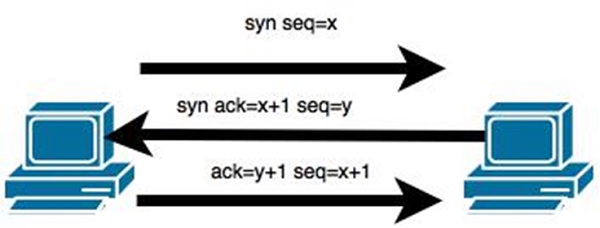
In theory, a TCP/IP connection is established as shown below −
TCP/IP
To hijack this connection, there are two possibilities −
  • Find the seq which is a number that increases by 1, but there is no chance to predict it.
  • The second possibility is to use the Man-in-the-Middle attack which, in simple words, is a type of network sniffing. For sniffing, we use tools like Wireshark or Ethercap.

Example

An attacker monitors the data transmission over a network and discovers the IP’s of two devices that participate in a connection.
When the hacker discovers the IP of one of the users, he can put down the connection of the other user by DoS attack and then resume communication by spoofing the IP of the disconnected user.

Shijack

In practice, one of the best TCP/IP hijack tools is Shijack. It is developed using Python language and you can download it from the following link − https://packetstormsecurity.com/sniffers/shijack.tgz
Here is an example of a Shijack command −
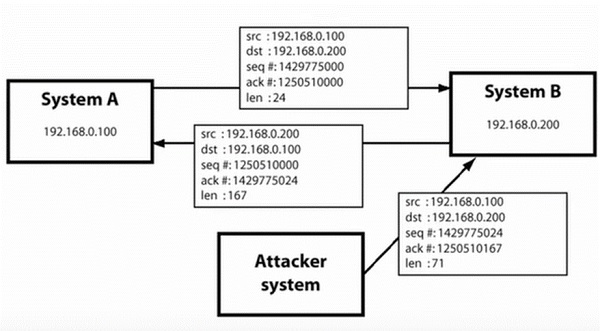
root:/home/root/hijack# ./shijack eth0 192.168.0.100 53517 192.168.0.200 23
Shijack
Here, we are trying to hijack a Telnet connection between the two hosts.

Hunt

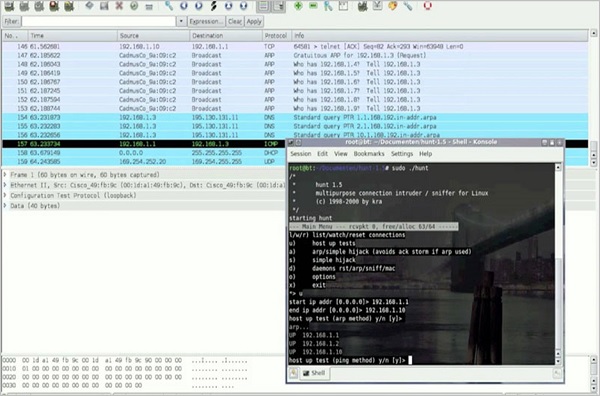
Hunt is another popular tool that you can use to hijack a TCP/IP connection. It can be downloaded from − https://packetstormsecurity.com/sniffers/hunt/
Hunt

Quick Tip

All unencrypted sessions are vulnerable to TCP/IP session hijacking, so you should be using encrypted protocols as much as possible. Or, you should use double authentication techniques to keep the session secured.

Ethical Hacking - DDOS Attacks

A Distributed Denial of Service (DDoS) attack is an attempt to make an online service or a website unavailable by overloading it with huge floods of traffic generated from multiple sources.
Unlike a Denial of Service (DoS) attack, in which one computer and one Internet connection is used to flood a targeted resource with packets, a DDoS attack uses many computers and many Internet connections, often distributed globally in what is referred to as a botnet.
A large scale volumetric DDoS attack can generate a traffic measured in tens of Gigabits (and even hundreds of Gigabits) per second. We are sure your normal network will not be able to handle such traffic.

What are Botnets?

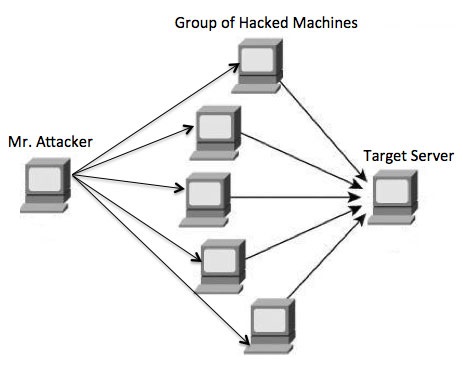
Attackers build a network of hacked machines which are known as botnets, by spreading malicious piece of code through emails, websites, and social media. Once these computers are infected, they can be controlled remotely, without their owners' knowledge, and used like an army to launch an attack against any target.
DDOS System
A DDoS flood can be generated in multiple ways. For example −
  • Botnets can be used for sending more number of connection requests than a server can handle at a time.
  • Attackers can have computers send a victim resource huge amounts of random data to use up the target's bandwidth.
Due to the distributed nature of these machines, they can be used to generate distributed high traffic which may be difficult to handle. It finally results in a complete blockage of a service.

Types of DDoS Attacks

DDoS attacks can be broadly categorized into three categories −
  • Volume-based Attacks
  • Protocol Attacks
  • Application Layer Attacks

Volume-Based Attacks

Volume-based attacks include TCP floods, UDP floods, ICMP floods, and other spoofedpacket floods. These are also called Layer 3 & 4 Attacks. Here, an attacker tries to saturate the bandwidth of the target site. The attack magnitude is measured in Bits per Second (bps).
  • UDP Flood − A UDP flood is used to flood random ports on a remote host with numerous UDP packets, more specifically port number 53. Specialized firewalls can be used to filter out or block malicious UDP packets.
  • ICMP Flood − This is similar to UDP flood and used to flood a remote host with numerous ICMP Echo Requests. This type of attack can consume both outgoing and incoming bandwidth and a high volume of ping requests will result in overall system slowdown.
  • HTTP Flood − The attacker sends HTTP GET and POST requests to a targeted web server in a large volume which cannot be handled by the server and leads to denial of additional connections from legitimate clients.
  • Amplification Attack − The attacker makes a request that generates a large response which includes DNS requests for large TXT records and HTTP GET requests for large files like images, PDFs, or any other data files.

Protocol Attacks

Protocol attacks include SYN floods, Ping of Death, fragmented packet attacks, Smurf DDoS, etc. This type of attack consumes actual server resources and other resources like firewalls and load balancers. The attack magnitude is measured in Packets per Second.
  • DNS Flood − DNS floods are used for attacking both the infrastructure and a DNS application to overwhelm a target system and consume all its available network bandwidth.
  • SYN Flood − The attacker sends TCP connection requests faster than the targeted machine can process them, causing network saturation. Administrators can tweak TCP stacks to mitigate the effect of SYN floods. To reduce the effect of SYN floods, you can reduce the timeout until a stack frees memory allocated to a connection, or selectively dropping incoming connections using a firewall or iptables.
  • Ping of Death − The attacker sends malformed or oversized packets using a simple ping command. IP allows sending 65,535 bytes packets but sending a ping packet larger than 65,535 bytes violates the Internet Protocol and could cause memory overflow on the target system and finally crash the system. To avoid Ping of Death attacks and its variants, many sites block ICMP ping messages altogether at their firewalls.

Application Layer Attacks

Application Layer Attacks include Slowloris, Zero-day DDoS attacks, DDoS attacks that target Apache, Windows or OpenBSD vulnerabilities and more. Here the goal is to crash the web server. The attack magnitude is measured in Requests per Second.
  • Application Attack − This is also called Layer 7 Attack, where the attacker makes excessive log-in, database-lookup, or search requests to overload the application. It is really difficult to detect Layer 7 attacks because they resemble legitimate website traffic.
  • Slowloris − The attacker sends huge number of HTTP headers to a targeted web server, but never completes a request. The targeted server keeps each of these false connections open and eventually overflows the maximum concurrent connection pool, and leads to denial of additional connections from legitimate clients.
  • NTP Amplification − The attacker exploits publically-accessible Network Time Protocol (NTP) servers to overwhelm the targeted server with User Datagram Protocol (UDP) traffic.
  • Zero-day DDoS Attacks − A zero-day vulnerability is a system or application flaw previously unknown to the vendor, and has not been fixed or patched. These are new type of attacks coming into existence day by day, for example, exploiting vulnerabilities for which no patch has yet been released.

How to Fix a DDoS Attack

There are quite a few DDoS protection options which you can apply depending on the type of DDoS attack.
Your DDoS protection starts from identifying and closing all the possible OS and application level vulnerabilities in your system, closing all the possible ports, removing unnecessary access from the system and hiding your server behind a proxy or CDN system.
If you see a low magnitude of the DDoS, then you can find many firewall-based solutions which can help you in filtering out DDoS based traffic. But if you have high volume of DDoS attack like in gigabits or even more, then you should take the help of a DDoS protection service provider that offers a more holistic, proactive and genuine approach.
You must be careful while approaching and selecting a DDoS protection service provider. There are number of service providers who want to take advantage of your situation. If you inform them that you are under DDoS attack, then they will start offering you a variety of services at unreasonably high costs.
We can suggest you a simple and working solution which starts with a search for a good DNS solution provider who is flexible enough to configure A and CNAME records for your website. Second, you will need a good CDN provider that can handle big DDoS traffic and provide you DDoS protection service as a part of their CDN package.
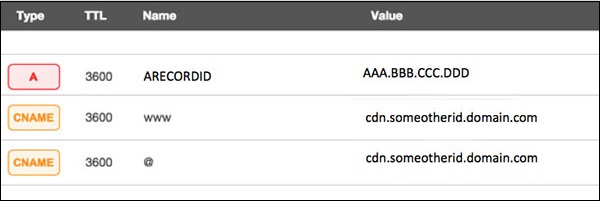
Assume your server IP address is AAA.BBB.CCC.DDD. Then you should do the following DNS configuration −
  • Create a A Record in DNS zone file as shown below with a DNS identifier, for example, ARECORDID and keep it secret from the outside world.
  • Now ask your CDN provider to link the created DNS identifier with a URL, something like cdn.someotherid.domain.com.
  • You will use the CDN URL cdn.someotherid.domain.com to create two CNAME records, the first one to point to www and the second record to point to @ as shown below.
You can take the help from your system administrator to understand these points and configure your DNS and CDN appropriately. Finally, you will have the following configuration at your DNS.
DNS Configuration
Now, let the CDN provider handle all type of DDoS attacks and your system will remain safe. But here the condition is that you should not disclose your system's IP address or A record identifier to anyone; else direct attacks will start again.

Quick Fix

DDoS attacks have become more common than ever before, and unfortunately, there is no quick fix for this problem. However, if your system is under a DDoS attack, then don’t panic and start looking into the matter step by step.

Ethical Hacking - Social Engineering

Let us try to understand the concept of Social Engineering attacks through some examples.

Example 1

You must have noticed old company documents being thrown into dustbins as garbage. These documents might contain sensitive information such as Names, Phone Numbers, Account Numbers, Social Security Numbers, Addresses, etc. Many companies still use carbon paper in their fax machines and once the roll is over, its carbon goes into dustbin which may have traces of sensitive data. Although it sounds improbable, but attackers can easily retrieve information from the company dumpsters by pilfering through the garbage.

Example 2

An attacker may befriend a company personnel and establish good relationship with him over a period of time. This relationship can be established online through social networks, chatting rooms, or offline at a coffee table, in a playground, or through any other means. The attacker takes the office personnel in confidence and finally digs out the required sensitive information without giving a clue.

Example 3

A social engineer may pretend to be an employee or a valid user or an VIP by faking an identification card or simply by convincing employees of his position in the company. Such an attacker can gain physical access to restricted areas, thus providing further opportunities for attacks.

Example 4

It happens in most of the cases that an attacker might be around you and can do shoulder surfing while you are typing sensitive information like user ID and password, account PIN, etc.

Phishing Attack

A phishing attack is a computer-based social engineering, where an attacker crafts an email that appears legitimate. Such emails have the same look and feel as those received from the original site, but they might contain links to fake websites. If you are not smart enough, then you will type your user ID and password and will try to login which will result in failure and by that time, the attacker will have your ID and password to attack your original account.

Quick Fix

  • You should enforce a good security policy in your organization and conduct required trainings to make all the employees aware of the possible Social Engineering attacks and their consequences.
  • Document shredding should be a mandatory activity in your company.
  • Make double sure that any links that you receive in your email is coming from authentic sources and that they point to correct websites. Otherwise you might end up as a victim of Phishing.
  • Be professional and never share your ID and password with anybody else in any case.

Ethical Hacking - Pen Testing

Penetration Testing is a method that many companies follow in order to minimize their security breaches. This is a controlled way of hiring a professional who will try to hack your system and show you the loopholes that you should fix.
Before doing a penetration test, it is mandatory to have an agreement that will explicitly mention the following parameters −
  • what will be the time of penetration test,
  • where will be the IP source of the attack, and
  • what will be the penetration fields of the system.
Penetration testing is conducted by professional ethical hackers who mainly use commercial, open-source tools, automate tools and manual checks. There are no restrictions; the most important objective here is to uncover as many security flaws as possible.

Types of Penetration Testing

We have five types of penetration testing −
  • Black Box − Here, the ethical hacker doesn’t have any information regarding the infrastructure or the network of the organization that he is trying to penetrate. In black-box penetration testing, the hacker tries to find the information by his own means.
  • Grey Box − It is a type of penetration testing where the ethical hacker has a partial knowledge of the infrastructure, like its domain name server.
  • White Box − In white-box penetration testing, the ethical hacker is provided with all the necessary information about the infrastructure and the network of the organization that he needs to penetrate.
  • External Penetration Testing − This type of penetration testing mainly focuses on network infrastructure or servers and their software operating under the infrastructure. In this case, the ethical hacker tries the attack using public networks through the Internet. The hacker attempts to hack the company infrastructure by attacking their webpages, webservers, public DNS servers, etc.
  • Internal Penetration Testing − In this type of penetration testing, the ethical hacker is inside the network of the company and conducts his tests from there.
Penetration testing can also cause problems such as system malfunctioning, system crashing, or data loss. Therefore, a company should take calculated risks before going ahead with penetration testing. The risk is calculated as follows and it is a management risk.
RISK = Threat × Vulnerability

Example

You have an online e-commerce website that is in production. You want to do a penetration testing before making it live. Here, you have to weigh the pros and cons first. If you go ahead with penetration testing, it might cause interruption of service. On the contrary, if you do not wish to perform a penetration testing, then you can run the risk of having an unpatched vulnerability that will remain as a threat all the time.
Before doing a penetration test, it is recommended that you put down the scope of the project in writing. You should be clear about what is going to be tested. For example −
  • Your company has a VPN or any other remote access techniques and you want to test that particular point.
  • Your application has webservers with databases, so you might want to get it tested for SQL injection attacks which is one of the most crucial tests on a webserver. In addition, you can check if your webserver is immune to DoS attacks.

Quick Tips

Before going ahead with a penetration test, you should keep the following points in mind −
  • First understand your requirements and evaluate all the risks.
  • Hire a certified person to conduct penetration test because they are trained to apply all the possible methods and techniques to uncover possible loopholes in a network or web application.
  • Always sign an agreement before doing a penetration test.

Recent Posts